
Qwickly Attendance Tracking
Efficient attendance tracking and reporting within Canvas.Qwickly Attendance Tracking
Efficient attendance tracking and reporting within Canvas.
Qwickly Attendance is a user-friendly tool in Canvas that streamlines attendance tracking for face-to-face, hybrid, and online courses—making it easier for instructors to stay organized and for students to stay accountable. With flexible features and full Canvas integration, Qwickly supports manual, online check-in, or QR code attendance-taking methods and integrates seamlessly with the Canvas Gradebook.
Getting Started
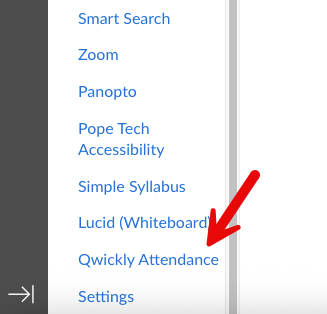 Step 1: Configure Attendance Settings
- Click the Qwickly Attendance link in the course navigation.
- Customize settings for automated absence emails, grading preferences, and more.
Step 2: Take Attendance
- Choose how you would like to take attendance:
- View participation trends and generate reports as needed.
- Access Qwickly Attendance through the course menu in Canvas.
- Follow the check-in instructions during class:
- Enter a code (provided by your instructor), or
- Scan a QR code with your mobile device using the Qwickly mobile app (downloaded via Google Play or the App Store) and selecting Southern Methodist University.
- Note: If you are experiencing issues, please submit a support ticket at https://goqwickly.com/support/.